
DineFlow POS · Kitchen · Tables · Stock · ReportsWatch tour

Serve faster. Cook calmer.
Control every rupee.

DineFlow POS is an end-to-end restaurant management system for dine-in restaurants, fast food, cafes and delivery kitchens. Billing, the kitchen screen, tables, stock, cash and reports stay in sync, live, from the first order to closing.
  • Faster billing, shorter queues
  • Clear orders for your kitchen
  • Keep stock and costs in check
  • See your daily sales and profit
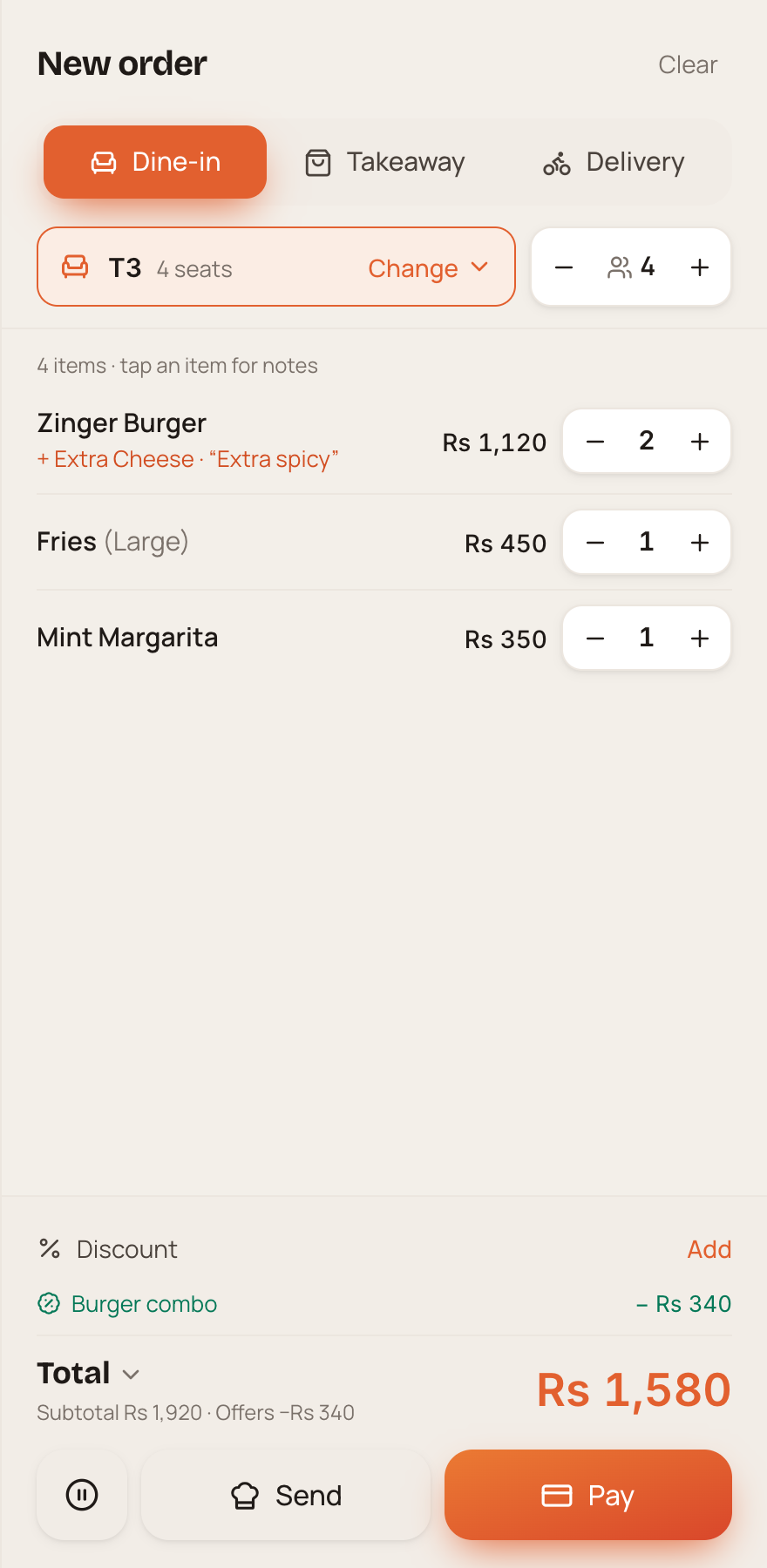
DineFlow order panel for dine-in table T3
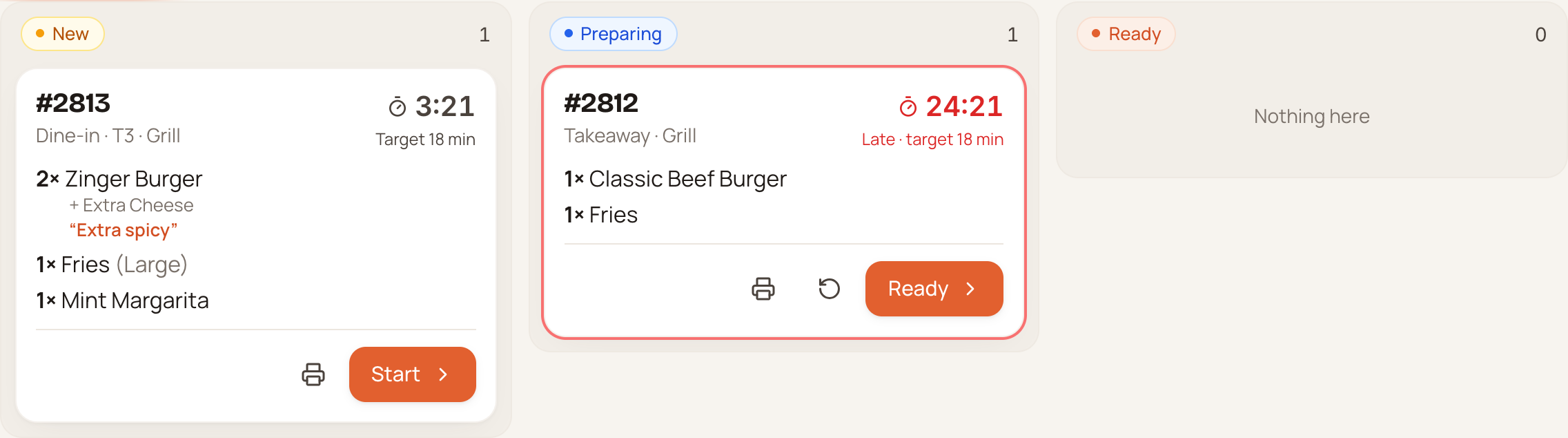
Live kitchen order tickets in DineFlow
  • Dine-in restaurants
  • Fast food & takeaway
  • Cafes & coffee shops
  • Bakeries & cake shops
  • Pizzerias
  • Burger & sandwich shops
  • BBQ & grill restaurants
  • Desi & family restaurants
  • Cloud & delivery kitchens
  • Dessert & ice cream parlours
  • Juice & smoothie bars
  • Tea shops & dhabas
  • Food trucks & kiosks
  • Food court counters
  • Canteens & cafeterias
  • Buffet restaurants
  • Hotel restaurants
  • Catering kitchens

How one order flows

From the counter to the kitchen to the bill, without a single paper slip.

This is an order in DineFlow: table T3, two Zinger Burgers, large fries and a drink.

01

Take the order

Pick dine-in, takeaway or delivery, choose the table, then add sizes, add-ons and notes in a few taps.

02

Offers apply themselves

Combos, happy hours and coupons apply on their own. Tax and service charge are added for you.

03

Kitchen sees it instantly

The ticket lands on the kitchen screen the moment you hit send. Live timers flag late orders in red.

04

Pay any way, print clean

Part cash, part card on one bill. A receipt with your logo prints on 80mm or 58mm paper.

See it in action

Watch a real order go from table to receipt.

A walkthrough of DineFlow: ordering, the kitchen screen, split payments, stock, reports and more.

Book a live demo

Everything in one system

Billing, kitchen, tables, stock, cash and reports. Connected.

Fast billing at the counter

  • Dine-in, takeaway and delivery orders in a few taps
  • Sizes, add-ons and special notes on every item
  • Tax and service charge added automatically
  • Logo receipts on 80mm or 58mm paper
  • Hold an order and pick it up later

Payments that fit how customers pay

  • Cash, card or several methods on one bill
  • Split a bill by item; merge or move tables in seconds
  • Full or partial refunds, every one recorded

A kitchen that never misses an order

  • Orders reach the kitchen screen the moment they're placed
  • Grill, bar and cold stations see only their own items
  • Live timers flag late orders early
  • Tickets print straight to kitchen printers
  • Added or cancelled items clearly marked

Tables and reservations

  • Live floor plan: free, occupied or waiting for the bill
  • See how long each table has been seated
  • Reservations warn about double bookings

Stock that counts itself

  • Recipes deduct ingredients with every sale
  • Low-stock alerts before you run out
  • Wastage and stock transfers tracked
  • Suppliers, purchase orders, bills and balances owed

Expenses and cash under control

  • Every expense recorded, with approvals for large amounts
  • Cashier shifts show if the drawer is short or over
  • End-of-day (Z) report ready the moment you close

Customers who come back

  • Customer profiles with order history
  • Loyalty points earned and spent at the counter
  • Happy hours, coupons, combos and buy-one-get-one, all automatic

Delivery made simple

  • Assign orders to riders and track who has which
  • A delivery charge for each zone
  • Rider cash collection and settlement, nothing missing

Your restaurant, your rules

  • Every staff member has their own login and sees only what their role allows
  • Manager PIN for discounts, voids, cancellations and refunds
  • Full activity log: who did what, and who approved it

Know your numbers

  • Daily, weekly and monthly sales at a glance
  • Best sellers, busy hours, dine-in vs takeaway vs delivery
  • Profit after ingredient costs
  • Export to Excel or CSV for your accountant

Reliable and safe

  • Every device updates live: counter, kitchen and the manager's phone
  • Runs on your restaurant's own network, or online on your own web address
  • Automatic daily backups, plus one-click backup and restore

See it working with your own menu.

We'll walk you through DineFlow and set it up around the way your restaurant runs.

Book a demo

Point of sale

A counter that keeps the queue moving.

Photos, categories and search put every item one tap away. The order panel shows notes, add-ons and offers as you build it, so the total is right before the customer asks.

  • No manual calculations: tax, service and offers apply on their own
  • Rupees, dollars, euros or dirhams, your choice of currency symbol
  • Touch-first, made for the counter tablet or PC

Kitchen display

A calmer kitchen, without slips running back and forth.

Tickets move from New to Preparing to Ready with one tap. Each one shows its table, its notes in red and a timer against your target time, so late orders stand out before anyone complains.

  • Separate stations for grill, bar and cold
  • Network kitchen printers (ESC/POS) or browser printing

Inventory

Know where every kilo went.

Link each menu item to its recipe and DineFlow deducts the ingredients with every sale. Stock by location, average cost and value are always current, and low items are flagged before service.

  • Receive, waste, transfer and stock-count in one place
  • Suppliers, overdue bills and balances owed at a glance

Reports

Full control of every rupee.

Sales by day, busy hours, best sellers and order types for any period. The profit view subtracts ingredient costs and expenses, so you see what is actually left.

  • End-of-day (Z) report ready at closing
  • One-click export to Excel or CSV

Pricing

A clear quote, shaped around your restaurant.

Pricing depends on your outlets, devices and setup. Book a demo and we'll send a clear quote before anything starts.

Get a quote

Getting started

Live in your restaurant, with us beside you.

  1. 1

    Demo & quote

    We show DineFlow, learn how your restaurant runs, and send a clear quote.

  2. 2

    Setup

    Your menu, tables, printers, staff roles and tax settings are configured.

  3. 3

    Training

    Cashiers, kitchen and managers each learn the screens they use.

  4. 4

    Go live & support

    Open your first shift on DineFlow, with our team a WhatsApp message away.

FAQ

Questions restaurant owners ask us.

Something else?

Ask us on WhatsApp
Does DineFlow need the internet to work?

No. It can run on your restaurant's own network, so the counter and kitchen keep working together. You can also run it online on your own web address to check sales from anywhere. We agree the hosting and network setup with you before rollout.

Which devices and printers does it work with?

DineFlow runs in a web browser on desktop computers, laptops and compatible tablets or touch POS terminals. Receipts support 80mm and 58mm layouts, with browser printing or supported ESC/POS network printers. Share your device and printer models so we can confirm compatibility.

Can I stop staff from giving discounts or voiding items?

Yes. Each staff login has role-based permissions. Sensitive actions such as larger discounts, voids, cancellations and refunds can require manager PIN approval. The activity log records the action and who approved it.

What happens to my data if a device fails?

The system stores data on your configured server, not separately on every counter device. Automatic daily backups and manual backup and restore help protect those records. We plan the backup location, retention and recovery responsibilities during setup.

How much does it cost?

Pricing depends on your outlets, devices, modules and setup. Book a demo so we can review the way your restaurant works and send a clear quote before anything starts.

Book a demo

Faster service, a calmer kitchen, and full control of every rupee.

Tell us about your restaurant and we'll set up a live walkthrough at a time that suits you.

Your details are used to arrange your demo. Privacy policy